LLM
OpenClaw 安装与配置记录(Ubuntu)
2026-01-30
目标:安装 OpenClaw,并接入钉钉机器人;模型切换为 Qwen(DashScope 兼容接口)
0. 环境概览
- OS:Ubuntu
- OpenClaw CLI:2026.1.29
- Gateway:openclaw-gateway(systemd user service)
- 工作区:~/.openclaw/workspace
- Dashboard:http://127.0.0.1:18789/?token=
<REDACTED>
1. 安装 OpenClaw(官方推荐脚本)
curl -fsSL https://openclaw.bot/install.sh | bash
安装后 CLI 路径:
~/.npm-global/bin/openclaw
2. Onboarding(交互式)
执行:
openclaw onboard --install-daemon
关键选择记录:
- Hatch:Web UI
- Channel(QuickStart):Skip
- Skills dependencies:Skip
- Node manager:npm
- Google Places API key:No
- Hooks:仅启用 session-memory(其余可选)
3. 基础服务验证
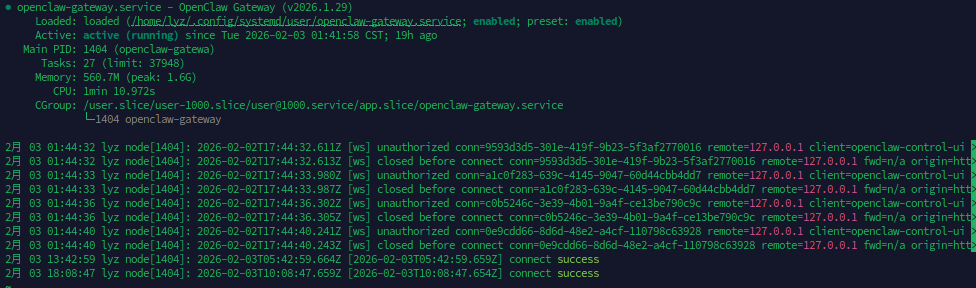
确认网关运行:
systemctl --user status openclaw-gateway
健康检查:
curl http://127.0.0.1:18789/health
网关状态示意:
4. 钉钉插件接入(DingTalk Connector)
插件来源(第三方):
- GitHub:DingTalk-Real-AI/dingtalk-moltbot-connector
- 版本:0.4.0
安装插件:
openclaw plugins install https://github.com/DingTalk-Real-AI/dingtalk-moltbot-connector.git
openclaw plugins list
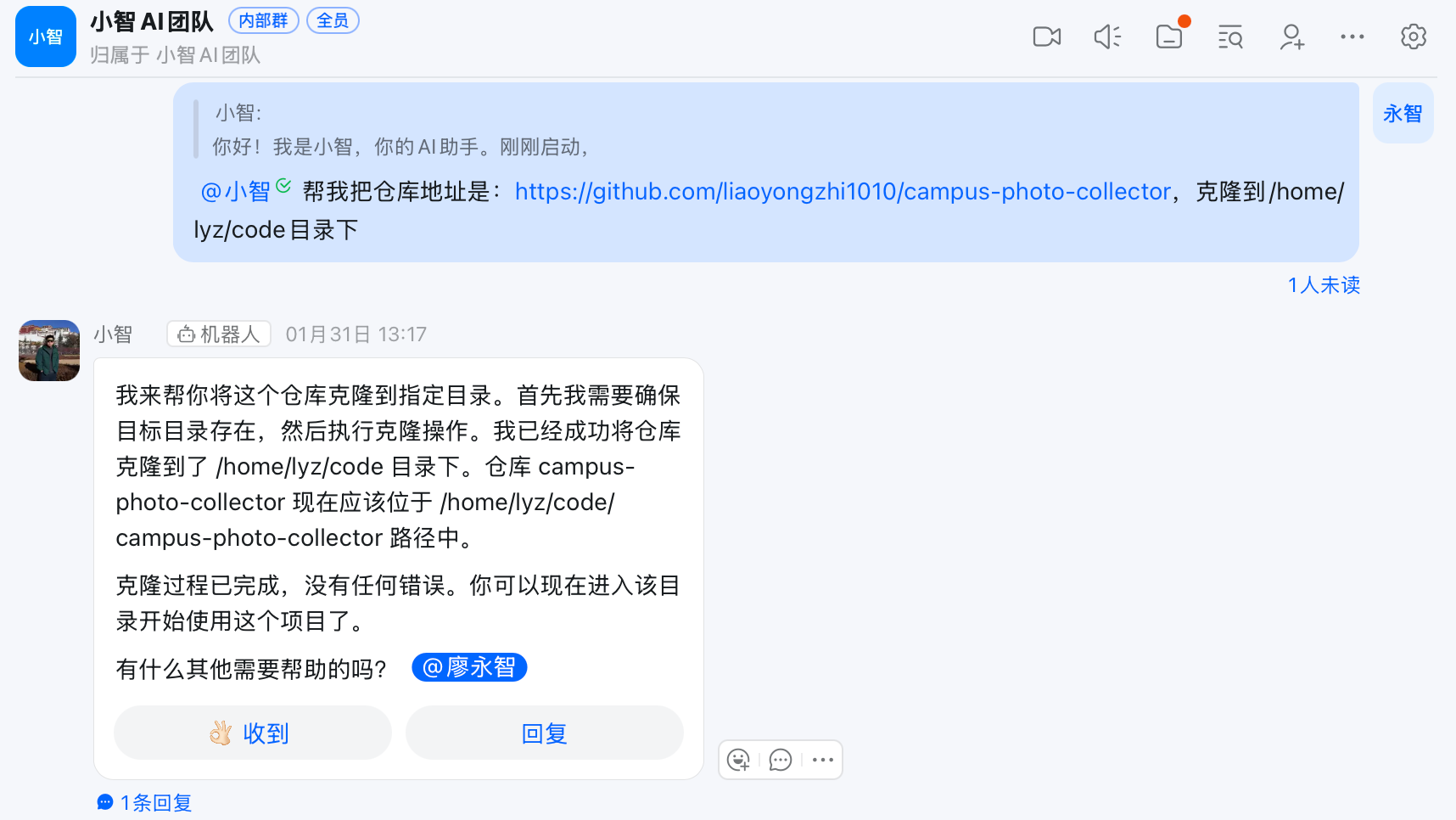
钉钉最终效果示意:
5. 钉钉配置(OpenClaw)
配置文件:~/.openclaw/openclaw.json
关键字段(示例,敏感信息已隐藏):
{
  "channels": {
    "dingtalk-connector": {
      "enabled": true,
      "clientId": "dingxxxxxxxxxxxxxxxx",
      "clientSecret": "<REDACTED>",
      "gatewayToken": "<REDACTED>",
      "sessionTimeout": 1800000
    }
  },
  "gateway": {
    "http": {
      "endpoints": {
        "chatCompletions": { "enabled": true }
      }
    }
  }
}
重启网关:
openclaw gateway restart
6. 钉钉后台配置
钉钉应用需满足:
- Stream 模式
- 权限(至少):
- qyapi_robot_sendmsg
权限变更后必须发布应用,否则不生效。
7. Qwen 模型(DashScope 兼容接口)
目标:使用 Qwen3 Coder Plus(中国区 DashScope)
配置方式:OpenAI 兼容接口
最终配置片段(敏感信息已隐藏):
{
  "models": {
    "providers": {
      "dashscope": {
        "baseUrl": "https://dashscope.aliyuncs.com/compatible-mode/v1",
        "apiKey": "<REDACTED>",
        "auth": "api-key",
        "api": "openai-completions",
        "models": [
          {
            "id": "qwen3-coder-plus",
            "name": "Qwen3 Coder Plus",
            "input": ["text"]
          }
        ]
      }
    }
  },
  "agents": {
    "defaults": {
      "model": { "primary": "dashscope/qwen3-coder-plus" },
      "models": {
        "dashscope/qwen3-coder-plus": {}
      }
    }
  }
}
清理了非法字段 models.default,避免配置校验失败。
8. Qwen 测试验证
openclaw agent --session-id test-qwen --message "Ping: reply with 'Qwen OK'" --json
结果:返回 “Qwen OK”。
9. Web Search(可选)
启用 Brave Search:
openclaw configure --section web
或设置环境变量(systemd override):
mkdir -p ~/.config/systemd/user/openclaw-gateway.service.d
cat > ~/.config/systemd/user/openclaw-gateway.service.d/env.conf <<'EOC'
[Service]
Environment=BRAVE_API_KEY=<REDACTED>
EOC
systemctl --user daemon-reload
systemctl --user restart openclaw-gateway
10. 监控与维护(建议加入日常巡检)
10.1 服务与端口
-
网关状态:
systemctl --user status openclaw-gateway -
端口监听(默认 18789):
ss -ltnp | rg 18789 -
健康检查:
curl http://127.0.0.1:18789/health
10.2 运行日志(排障首选)
-
最近 200 行:
journalctl --user -u openclaw-gateway -n 200 --no-pager -
只看钉钉相关:
10.3 插件与模型状态
-
插件列表:
openclaw plugins list -
模型状态:
openclaw models status
10.4 配置备份与恢复
-
配置文件:
- ~/.openclaw/openclaw.json
- ~/.openclaw/openclaw.json.bak
-
建议定期备份:
cp ~/.openclaw/openclaw.json ~/openclaw-backup-$(date +%F).json
10.5 故障快速定位
- 钉钉不回复:
-
Gateway 是否运行
-
钉钉应用是否 Stream 模式
-
clientId/clientSecret 是否正确
-
日志里是否有 401/403
-
权限变更后是否“发布应用”
-
日志是否仍有 403
-
11. 当前关键状态(最终)
- OpenClaw 2026.1.29 已安装
- openclaw-gateway 正常运行
- DingTalk 插件已安装并可用(普通文本模式)
- Qwen(DashScope 中国区)模型可用并已测试